Download YouTube live stream
Download youtube live stream: wait until the replay exists, paste the watch URL, and save the video to a folder on this computer.
You searched download youtube live stream. While the badge still says LIVE, a converter you found in search over-promises. A copied command reaches for flags that record the stream as it is written.
You wanted the finished video in a folder — not a partial capture, and not a terminal.
KeepCopy is a desktop video downloader, not a website that fetches the video for you. To download YouTube live stream here, wait until the replay exists, paste the watch URL, pick 1080p MP4 or 4K MP4, and save the video to a folder on this computer. Official yt-dlp plus ffmpeg run locally. The pasted URL never goes through our servers. The desktop app sends no telemetry.
On this page
- Why a live download fails during the broadcast
- The inspect warning
- Wait until the replay exists
- Members-only replays
- How to download a YouTube live replay in KeepCopy
- What this will not do
- If you wanted a normal watch link
- Micro-FAQ
Why a live download fails during the broadcast
A live stream is still being written. There is no complete file yet. YouTube is sending chunks. A paste box that claims a finished MP4 during LIVE is guessing.
A browser extension is another approach, with its own permissions and data handling.
KeepCopy stays a desktop video downloader. This page is the YouTube live replay job — including a premiere that has ended. Your computer talks to YouTube. We do not see the URL.
A public watch, youtu.be, or Shorts link that was never live is YouTube to MP4. A Twitch past broadcast is Download a Twitch VOD. Come back here when the YouTube page was live.
The inspect warning
KeepCopy shows the state reported by the engine on the inspect card:
- Live stream — download may be incomplete or unavailable for an active stream.
- Scheduled stream — wait for the replay, or the download may be empty for an upcoming stream.
- Stream just ended — replay may not be ready yet while a replay is processing.
These are advisory warnings. They do not disable Download or schedule a later attempt.
If you see it, do not treat Download as a recorder. Wait. Paste again when the warning is gone.
Wait until the replay exists
The URL often stays the same. After YouTube archives the broadcast, the page shows a duration instead of LIVE. Inspect no longer shows the live warning.
Then this is an ordinary YouTube video. Choose an available video quality. ffmpeg can join separate picture and audio streams with any video preset.
Processing can take minutes or longer. A 4K or multi-hour stream can sit in post_live after the badge changes. If the warning is still there, wait again.
If the creator turned replay off, or deleted the archive, there is nothing to save. KeepCopy cannot restore it.
Members-only replays
A members-only live is still private after it ends. Start from a browser where you can already open that replay.
If inspect fails, or the queue title is sign in required or YouTube is asking for verification, open Site access under the paste field. Choose cookies from Chrome, Chromium, Brave, Edge, Firefox, or Safari, or a cookies.txt file. Then press Add again.
KeepCopy reads cookies locally and yt-dlp sends applicable cookies to the host, never through our servers. They reuse a session you already have. They do not grant a replay that account cannot play. The full path is Video download says sign in required.
How to download a YouTube live replay in KeepCopy
Wait for the replay, paste the watch URL, pick 1080p or 4K, and save to a folder. You never type a live-from-start flag.
Step 1: Open KeepCopy
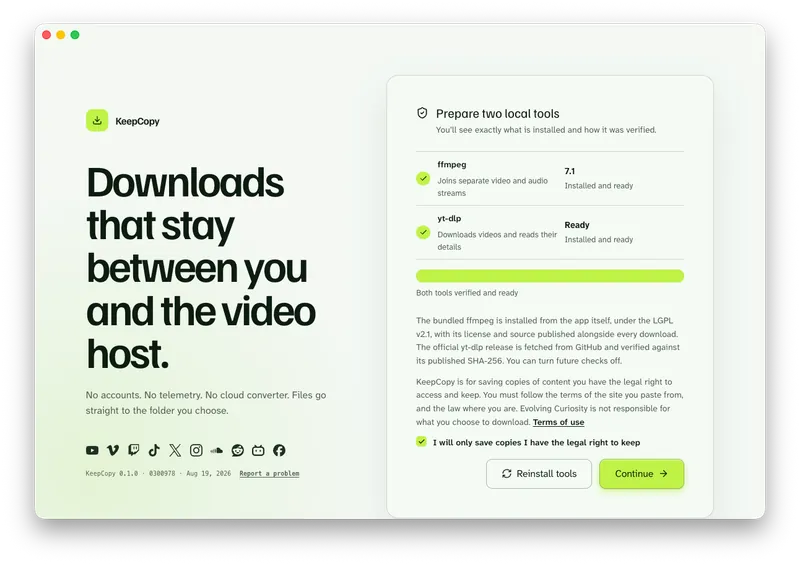
Launch KeepCopy on macOS or Windows. Linux is coming soon. First run installs and verifies the official yt-dlp release and ffmpeg on this computer. You do not hunt a package manager.
Step 2: Paste the watch URL after the warning is gone
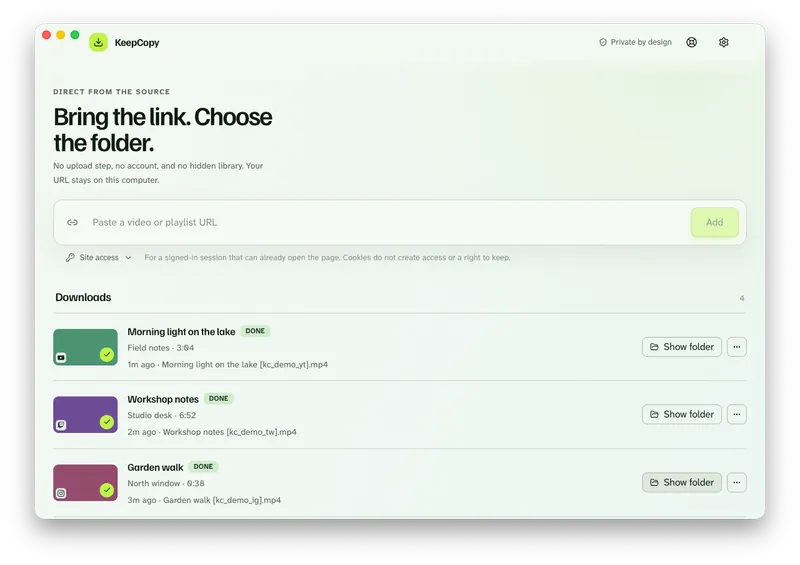
Drop in the youtube.com/watch?v= link (or the youtu.be share). Press Add. If inspect still shows a live, scheduled, or just-ended warning, stop. Wait for the replay. Paste again.
Step 3: Pick 1080p or 4K, then save to a folder
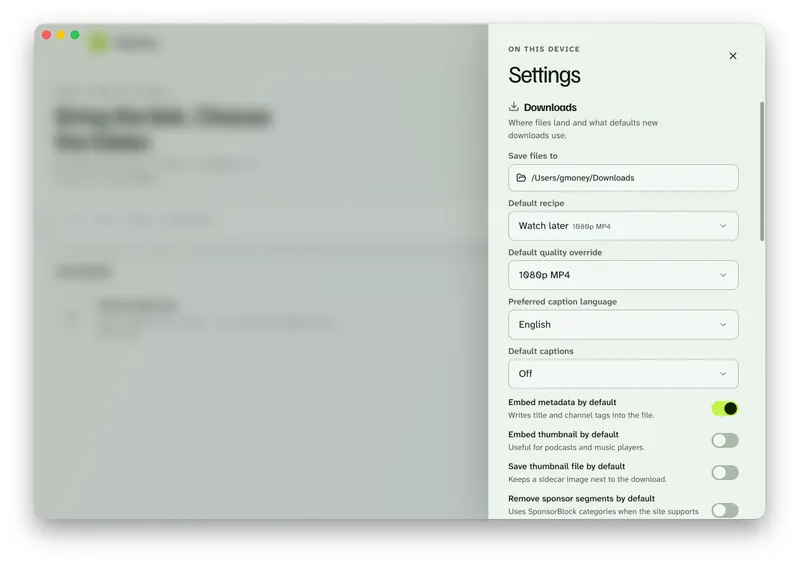
Choose 1080p MP4 or 4K MP4 when they appear. In Settings, set Save files to to a folder on this computer. Download queues the job. The queue shows progress, cancel, and retry. Show folder reveals the video when it finishes.
If the row failed after a long replay, Video download keeps failing.
Paste the replay URL in KeepCopy.
The MP4 labels are presets, not a guarantee of the final container. KeepCopy requests MP4 when joining separate streams. A source that needs no join can keep its original container, and codec compatibility depends on your player. Check the saved file if you specifically need MP4.
KeepCopy
No telemetry. No account. The video stays on this computer.
What this will not do
KeepCopy will not record a live premiere as a product. There is no live-from-start control.
The warnings do not block Download. Wait for the finished replay and inspect again before starting the job.
It will not restore a stream the host never saved or already deleted.
It will not rename KeepCopy a YouTube downloader. This page is one job. The product stays a desktop video downloader.
If a saved MP4 is mute, see Downloaded MP4 no audio.
If you wanted a normal watch link
Live is the trap. A public video that was never a broadcast is YouTube to MP4. Audio only is YouTube to MP3. A Twitch past broadcast is Download a Twitch VOD — that host is not this URL.
The download stays local-first. For the path of a pasted link, read What stays on your computer. More workflow notes live with this one.
Micro-FAQ
Can I download a YouTube live while it is still broadcasting?
KeepCopy has no dedicated recording or scheduling controls. Inspect shows different warnings for live, scheduled, and just-ended streams. Download is not blocked by those warnings; wait for a finished replay to avoid an incomplete result.
When should I paste the URL?
Wait until the replay exists. The page shows a duration instead of LIVE, and the inspect warning is gone. Then paste the same watch URL.
What if the creator never saved a replay?
There is nothing to download. KeepCopy cannot restore a stream YouTube never archived or already took down.
What about a members-only live replay?
Use cookies from a listed browser or a cookies.txt file. KeepCopy reads cookies locally and yt-dlp sends applicable cookies to the host, never through our servers. They reuse a session you already have.
KeepCopy
Local-first desktop app
KeepCopy is a desktop video downloader. Paste a link, pick quality, and save the video to a folder on this computer.