Do you need Python for yt-dlp?
Do you need Python for yt-dlp? Not for the official standalone builds — they carry their own interpreter. What the engine needs, and how to skip the install.
You wanted a video in a folder, and instead you are reading a dependencies page about interpreter versions. Do you need Python for yt-dlp? is where a lot of first downloads stall.
The honest answer is yes and no, depending on which file you take off the release page. Guess wrong and the next twenty minutes go to a command line, a PATH, and a companion tool you did not know you were missing.
Below is the short answer, then the version where you install none of it yourself. KeepCopy is a local-first desktop video downloader that puts the official yt-dlp release on this computer for you and then asks you to paste a link.
On this page
- Do you need Python for yt-dlp? The short answer
- Why the answer looks contradictory
- Python is not the dependency that bites
- Then you own the upkeep
- What a desktop app installs instead
- Then the job is paste, pick, save
- What leaves this computer
- Micro-FAQ
Do you need Python for yt-dlp? The short answer
No — not if you use the official standalone build for your operating system. yt-dlp publishes those for Windows, macOS, and Linux, and the project’s own dependencies notes say the standalone release binaries are built with the Python interpreter included.
You do need Python in two cases:
- The platform-independent build. The release files table marks that one as needing Python, and recommends it for Linux and BSD.
- Installing yt-dlp as a Python package. Official docs list Python 3.10+ (CPython) and 3.11+ (PyPy) as the supported versions.
So the question is really which file did you download, not does this tool need Python.
Why the answer looks contradictory
One release page carries more than a dozen files, and the answer changes per row. There is a build per operating system, a 32-bit and an ARM64 build for Windows, packaged and unpackaged variants, plus the platform-independent one.
Search results contradict each other because each is describing a different row. Add a package manager into the mix and you now have two install paths with two upkeep stories, both of which end at a command you paste.
Python is not the dependency that bites
ffmpeg is. The official yt-dlp documentation lists ffmpeg and ffprobe as required for merging separate video and audio streams and for post-processing tasks such as saving audio only. They are not part of the yt-dlp download — you fetch them yourself and put them somewhere the engine can find them.
The engine’s docs also flag the trap directly: what you need is the ffmpeg binary, not the identically named Python package. Installing the wrong one is a common reason a “successful” install still cannot finish a normal download.
You see the result before you see the cause. A video with no sound, or a picture and a soundtrack sitting in two files, is the usual symptom — the walkthrough for that is downloaded MP4 no audio.
Then you own the upkeep
Installing the engine is the start of the job, not the end of it.
Release binaries can update themselves when you ask them to, and the project warns you in the output once your copy is more than 90 days old. That warning exists for a reason: video hosts change their pages, the handler for a site breaks, and a later official release is what fixes it. A stale copy is the ordinary explanation for a link that worked last month.
For what that means when a link fails, see what video hosts work.
What a desktop app installs instead
KeepCopy prepares two local tools on first launch: the official yt-dlp release for your computer, and ffmpeg. You see both, with the SHA-256 each was verified against, before anything downloads.
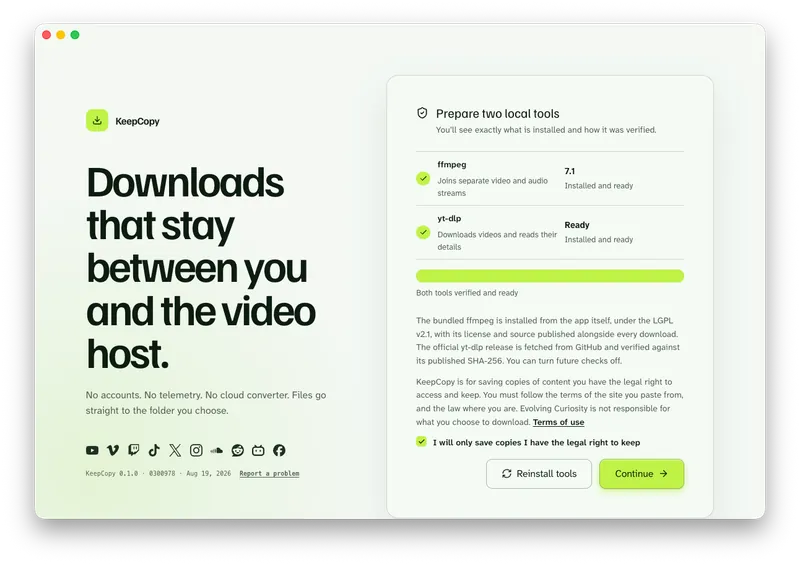
No Python to check. No PATH to set. No package manager, and no command to copy. The app installs the official release built for your operating system and verifies it before you paste anything.
Later, optional checks can look for a newer official yt-dlp release, and you can turn them off. If a tool ever looks wrong, Settings can repair or reinstall both. That is the path out of most stuck downloads — see video download keeps failing.
KeepCopy
No telemetry. No account. The video stays on this computer.
Then the job is paste, pick, save
Paste a video or playlist URL. The app inspects it here, on this computer, and shows you a title and the qualities that source actually offers. Pick one in ordinary language — 720p MP4, 1080p MP4, 4K MP4, best available, audio M4A, audio MP3, or Captions (SRT) — and the video lands in a folder on this computer, the one you set in Settings.
That is the whole workflow, written out step by step in yt-dlp without the terminal. On a Mac specifically, yt-dlp for Mac covers the same job.
It runs on macOS 12 or later and Windows 10 or later (64-bit). Linux is coming soon.
What leaves this computer
A pasted URL goes from your computer to the video host you chose. It is never forwarded through our servers. The app sends no telemetry and no crash reports, and there are no accounts.
First launch fetches the official yt-dlp release from GitHub and installs a bundled ffmpeg. After that, the check for a newer engine release is optional and can be switched off. For the full path of a pasted link, read what stays on your computer and the privacy page.
More workflow guides sit with this one. The product hub is the desktop video downloader on the home page.
Micro-FAQ
Do you need Python for yt-dlp?
Not if you use the official standalone build for your operating system. The yt-dlp project builds those with the Python interpreter included. You do need Python for the platform-independent build, which the release table marks as needing one, and for installing yt-dlp as a Python package (3.10+ CPython, 3.11+ PyPy).
Does KeepCopy install Python on my computer?
No. On first launch it installs the official standalone yt-dlp release for your platform plus ffmpeg, and shows you the SHA-256 each was verified against.
Do I need to install ffmpeg separately?
Not with KeepCopy — it installs one for you. On the command line you install it yourself. Official yt-dlp documentation lists ffmpeg and ffprobe as separate downloads, required for merging separate video and audio streams and for post-processing.
Which computers does KeepCopy run on?
macOS 12 or later, and Windows 10 or later (64-bit). Linux is coming soon.
Do I still have to use the command line?
No. The engine is the same official yt-dlp release. The app runs it for you instead of asking you to type it.
KeepCopy
Local-first desktop app
KeepCopy is a desktop video downloader. Paste a link, pick quality, and save the video to a folder on this computer.