Download embedded video
Download embedded video: paste the article, wiki, or course page, inspect it locally, and save the video to a folder on this computer.
You searched download embedded video. The player is on a news article, a wiki, or a course page. There is no download button. The usual result is F12 in the browser, a browser extension, or a converter that wants that page URL.
You wanted the video in a folder — not a Network tab, and not a paste box on someone else’s site.
KeepCopy is a desktop video downloader, not a website that fetches the video for you. To download embedded video here, paste the page you are watching, inspect it on this computer, pick quality, and save the video to a folder. Official yt-dlp plus ffmpeg run locally. The pasted URL never goes through our servers. The desktop app sends no telemetry.
On this page
- Why embedded video usually means F12
- Paste the page with the player
- How yt-dlp finds a video on that page
- How to download embedded video in KeepCopy
- If inspect fails
- What this will not do
- If you already had a watch link
- Micro-FAQ
Why embedded video usually means F12
The page is not a video host. It is an article, a team wiki, or a lecture landing page with a player dropped in. Right-click save often fails. Search then points you at developer tools, an extension, or a converter.
A converter still takes the page URL through someone else’s server. A copied command wants flags you do not use.
KeepCopy stays a desktop video downloader. This page is only that job. Your computer talks to the page. We do not see the URL. There is no account with us and no crash reporting.
Which named sites we advertise is What video hosts work. The local contract — no cloud hop — is Save web video without a web converter. Come back here when the URL is the page with the player.
Paste the page with the player
Paste the address bar of the page you are watching, not the site home.
- A news article, wiki, or course page with a player on it is this job.
- Copy that URL. That is what KeepCopy inspects.
Use the page with the player rather than a homepage, category index, or search results page. Those other URLs may return an unrelated video, a list, or an error.
A YouTube watch, youtu.be, or Shorts URL is already one video. Use YouTube to MP4. An youtube.com/embed/ link is also one video, not an article.
A Vimeo video page on vimeo.com is Download a Vimeo video. If the Vimeo player sits on someone else’s article, paste that article.
How yt-dlp finds a video on that page
KeepCopy runs official yt-dlp. Three engine paths can turn a pasted page into a video. They are yt-dlp facts, not extra KeepCopy buttons. The Extractors wiki is the engine’s own note.
The engine already knows that host. A dedicated handler reads the page.
The page embeds a player the engine knows. A course or news page often drops in a player from a platform yt-dlp already handles. The page is not a video site. The player still can be.
A generic fallback looks for a video in the page when neither of those is a perfect match.
None of that is a KeepCopy guarantee. Extractors break when sites change. Paste to find out. Our host guide distinguishes the sites we name from the engine’s broader compatibility.
How to download embedded video in KeepCopy
Paste the page, inspect it, pick quality, and save the video to a folder. You never open developer tools. You never type a format code.
Step 1: Open KeepCopy
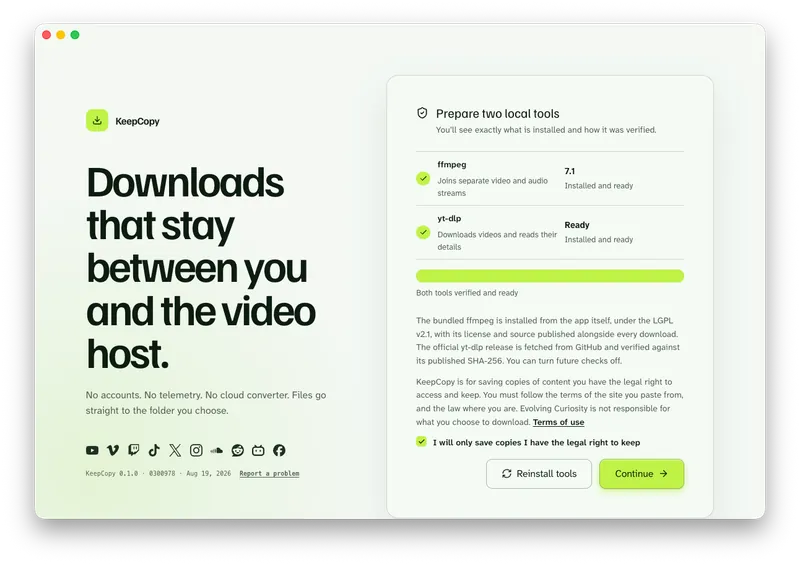
Launch KeepCopy on macOS or Windows. Linux is coming soon. First run installs and verifies the official yt-dlp release and ffmpeg on this computer. You do not hunt a package manager.
Step 2: Paste the page URL
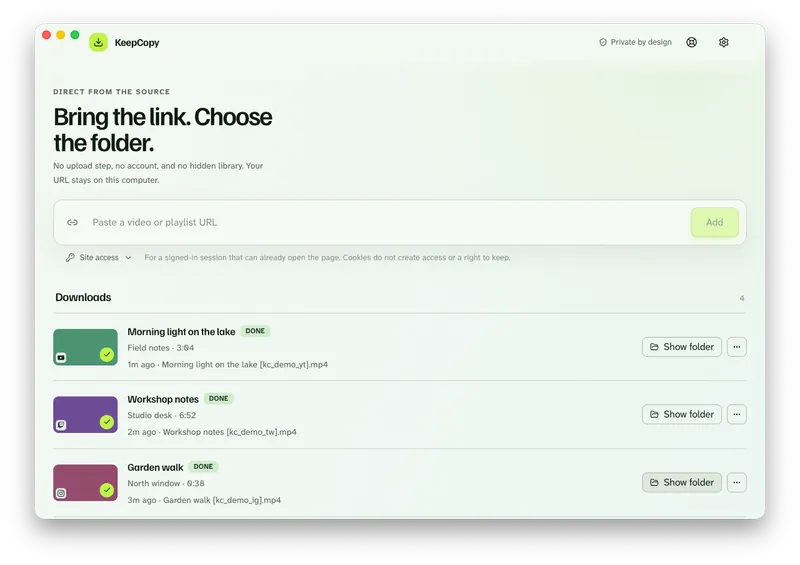
Drop in the article, wiki, or course URL. Press Add. The app inspects the link on this computer before anything is saved.
Step 3: Pick quality and save to a folder
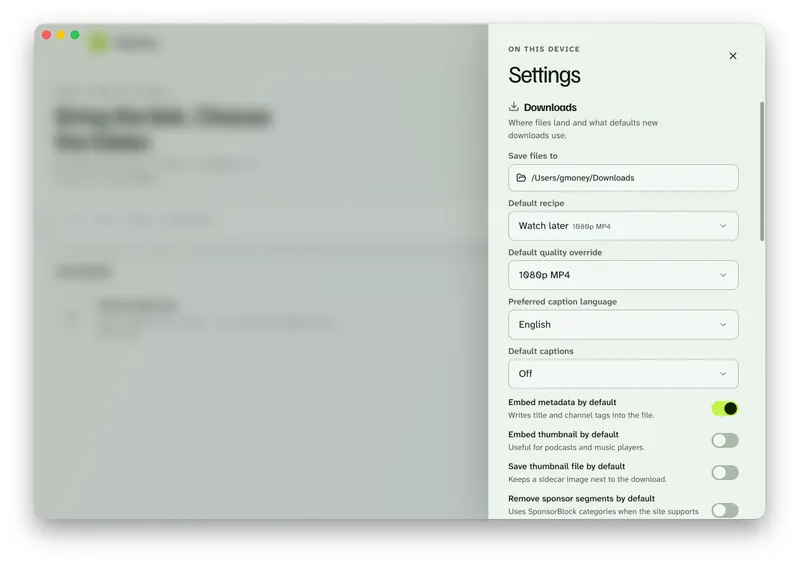
Choose 720p MP4, 1080p MP4, 4K MP4, or best available when they appear. Any video preset can use ffmpeg to join separate picture and sound streams when needed.
If you needed the words with the picture, that recipe is Download a lecture with captions. This page stays the embedded-player job.
In Settings, set Save files to to a folder on this computer. Download queues the job. Show folder reveals the video when it finishes.
Paste the page with the player in KeepCopy.
The MP4 labels are presets, not a guarantee of the final container. KeepCopy requests MP4 when joining separate streams. A source that needs no join can keep its original container, and codec compatibility depends on your player. Check the saved file if you specifically need MP4.
KeepCopy
No telemetry. No account. The video stays on this computer.
If inspect fails
A homepage is not this job. If the title is this link didn’t return a video, paste the page that actually plays the video.
If the title is this site isn’t supported, the engine could not handle that URL. A site may still have an extractor for other URL types. That catalog question is What video hosts work.
If the title is sign in required or YouTube is asking for verification, the page needs a session you already have. Open Site access under the paste field, then press Add again. Choose cookies from Chrome, Chromium, Brave, Edge, Firefox, or Safari, or a cookies.txt file. KeepCopy reads cookies locally and yt-dlp sends applicable cookies to the host, never through our servers. The full path is Video download says sign in required.
Cookies reuse a session. They do not unlock a video that account cannot play.
What this will not do
KeepCopy will not promise every embedded player. Paste to check. A later official yt-dlp release can fix a broken extractor. That is the optional update check, not a guarantee.
Stories are not a supported KeepCopy workflow. Stories are not a supported KeepCopy workflow.
It will not turn developer tools into the product. You paste the page. You do not copy a stream URL from a Network tab.
It will not send the page URL through our servers. The work stays on this computer.
If a saved MP4 is mute, see Downloaded MP4 no audio. If a row failed, Video download keeps failing.
If you already had a watch link
This page is the article, wiki, or course URL. A public YouTube watch link is YouTube to MP4. A Vimeo video page is Download a Vimeo video.
The download stays local-first. For the path of a pasted link, read What stays on your computer. More workflow notes live with this one.
Micro-FAQ
Which URL do I paste?
Paste the article, wiki, or course page where the player is running. Not the site home, and not a search results page.
What if I already have a YouTube watch link?
Paste that watch, youtu.be, or Shorts URL instead. That job is YouTube to MP4. This page is the page that is not a video host.
Does every embedded player work?
No. Official yt-dlp inspects the page. Some players work. Some do not. Paste to find out. Stories are not a supported KeepCopy workflow.
Does the page URL go through your servers?
No. KeepCopy inspects the link on this computer. The pasted URL never goes through our servers. The desktop app sends no telemetry.
KeepCopy
Local-first desktop app
KeepCopy is a desktop video downloader. Paste a link, pick quality, and save the video to a folder on this computer.