Download Reddit video with sound
Download reddit video with sound: paste the post URL, pick 1080p or 4K so ffmpeg joins one MP4 on this computer.
You found a Reddit post that plays with sound. You save it. The MP4 is silent.
That is Reddit’s usual split, not a broken speaker. Picture and audio travel as two streams. A converter you found in search pastes the same link through someone else’s page. A copied command that never runs ffmpeg keeps the picture and drops the soundtrack.
KeepCopy is the local desktop video downloader for that job. To download Reddit video with sound, paste the post URL, pick 1080p or 4K, and save one MP4 to a folder on this computer. Official yt-dlp plus ffmpeg join the streams here. No cloud hop.
On this page
- Why Reddit videos save silent
- Paste the Reddit post URL
- How to download Reddit video with sound
- Pick a quality that joins the soundtrack
- First launch installs ffmpeg
- A silent Reddit file you already have
- When the post never had sound
- Micro-FAQ
Why Reddit videos save silent
Reddit often stores video and audio as two streams. The page mixes them while you watch. A file on disk does not, unless something on this computer joins them.
That join is ffmpeg. Without it, the everyday result is a mute MP4 — or a tiny fallback that already had both mashed together. The player cannot invent a soundtrack that was never written.
A reddit video no audio file is that split, seen after the save. The generic mute diagnostic for any host is Downloaded MP4 no audio. This page stays on Reddit: paste a post, get one file with sound.
Do not run the silent MP4 through a cloud converter. That adds a hop you did not ask for. The video should land offline local media in a folder on this computer. The generic no-converter job — any host — is Save web video without a web converter.
Paste the Reddit post URL
Paste the post page, not the site homepage. The address looks like a reddit.com comments link, or the short share URL Reddit gives you. That is the link KeepCopy inspects.
A homepage, a subreddit front page, or a profile is not a video. The app will say so. A raw file URL from Reddit’s video host is also the wrong paste — it is often the picture stream alone.
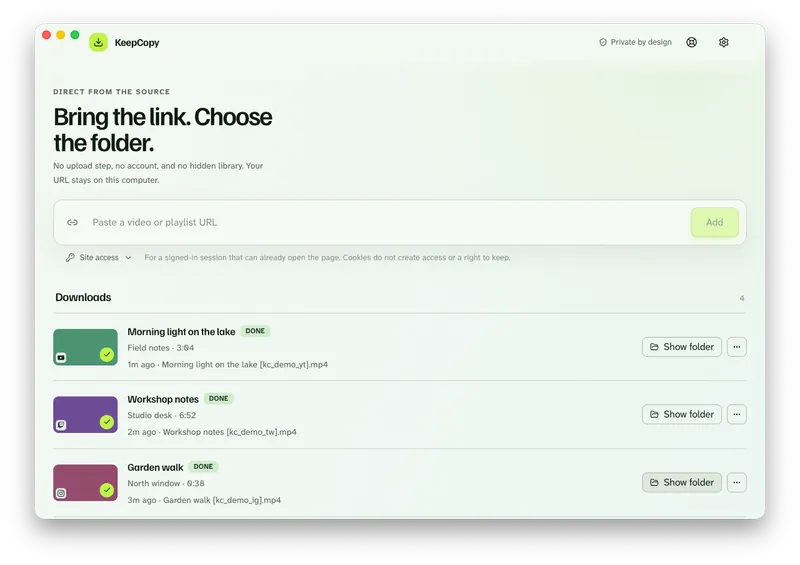
Copy the URL from the address bar or Share → Copy link on the post you watched. Then drop it into KeepCopy the way you would into a search bar.
If the link is a list of posts, inspect it and select the entries you want. The app does not silently download every item. The full picker walkthrough is Download selected videos from a playlist.
How to download Reddit video with sound
Paste the post, pick a joined quality, save to a folder. You never type a format code. You never install ffmpeg yourself.
Step 1: Open KeepCopy
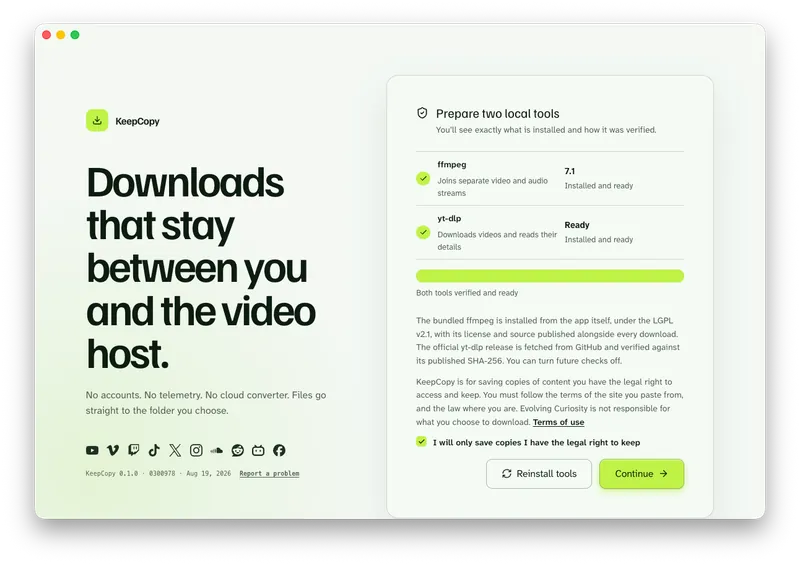
Launch KeepCopy on macOS or Windows. Linux is coming soon. First run installs and verifies the official yt-dlp release and ffmpeg on this computer.
Step 2: Paste the Reddit post URL
Drop in the post link. The app inspects it on this computer before anything is saved. You see a title and the options that actually apply.
Step 3: Pick 1080p or 4K
Choose 1080p MP4, 4K MP4, or best available when the post has them. Those labels are how ffmpeg writes one MP4 with picture and sound.
Skip audio MP3 and audio M4A unless you wanted the soundtrack only. Those labels drop the picture on purpose.
Step 4: Save it to a folder
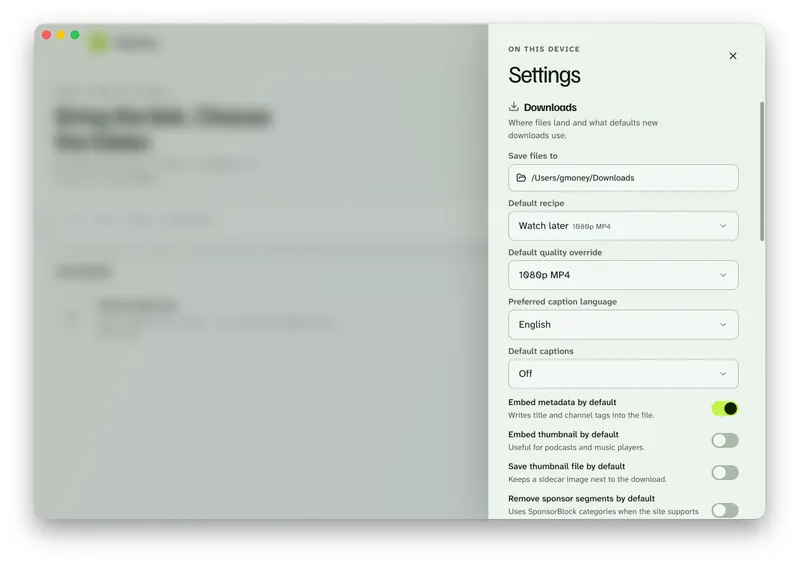
In Settings, set Save files to to a folder on this computer. The queue shows progress, cancel, and retry. When it finishes, Show folder reveals the file. Play it. You should hear the sound that played on Reddit.
KeepCopy
No telemetry. No account. The video stays on this computer.
Pick a quality that joins the soundtrack
The list is ordinary language. 720p MP4, 1080p MP4, 4K MP4, best available, audio M4A, audio MP3, or Captions (SRT). It shrinks to what that post offers.
For a Reddit clip you will watch later, pick 1080p MP4 or 4K MP4 when they appear. That is the join: one file, not a video-only stream.
Watch later is a shortcut for the same everyday presets. The full everyday path is Download 1080p video without command line.
Audio-only labels will not fix a mute video you meant to watch. Use them when you wanted MP3 or M4A on purpose — Download video as MP3 on the desktop.
If a host challenges the download, cookies from a listed browser stay on this computer. Follow Video download says sign in required. Public posts do not need it.
First launch installs ffmpeg
The silent Reddit file is usually a missing join, not a missing player. The join needs ffmpeg on this computer.
On first launch, KeepCopy places the official yt-dlp release and ffmpeg here and shows what was verified. You do not hunt a package manager, a PATH, or a copied command. If that machine is a Mac, see yt-dlp for Mac.
If something looks wrong later, Settings can repair or reinstall the tools. The next download still writes to the folder you choose.
The download stays local-first. Your computer talks to Reddit. Nothing is uploaded to us. There is no cloud converter in the middle. For the path of a pasted link, read What stays on your computer.
A silent Reddit file you already have
KeepCopy does not merge two files you already saved. There is no merger screen. ffmpeg joins streams as part of a new download.
Paste the same post URL again. Pick 1080p MP4 or 4K MP4. Save to a folder. The new file should have the soundtrack.
If the queue failed, retry from the queue or repair the tools in Settings, then download again — Video download keeps failing.
The longer “any host, mute MP4” write-up stays on Downloaded MP4 no audio. Come back here when the link is a Reddit post and the job is download reddit video with sound.
When the post never had sound
KeepCopy will not invent a soundtrack. Some Reddit posts are GIFs or silent uploads. If the page never played audio, the saved file will not either.
That is the source, not a failed join. Play the post in the browser first. If it is silent there, pick another post.
This app is not a player, a library, or a website that fetches the video for you. It will not silently download every item in a list — you select entries first.
The running desktop app sends no telemetry and no crash reports. More workflow notes live with this one. The paste-pick-save walkthrough is yt-dlp without the terminal.
Micro-FAQ
Why is a downloaded Reddit video silent?
Reddit often sends picture and sound as two streams. If those streams are not joined, you get a mute MP4. KeepCopy runs ffmpeg on this computer so 1080p or 4K lands as one file with sound.
Which URL should I paste?
Paste the Reddit post URL from the address bar or Share, not the site homepage and not a raw video file link.
Can KeepCopy add sound to a silent MP4 I already saved?
No. There is no merger screen. Paste the post URL again, pick 1080p or 4K, and save a new file. ffmpeg joins the streams during that download.
What if the Reddit post never had audio?
KeepCopy will not invent a soundtrack. GIFs and silent uploads stay silent. This page is for posts that played with sound in the browser.
KeepCopy
Local-first desktop app
KeepCopy is a desktop video downloader. Paste a link, pick quality, and save the video to a folder on this computer.